In the rapidly evolving landscape of SaaS tools, data collection is the backbone of almost every business. Whether you are running a small e-commerce store, managing HR for a mid-sized company, or organizing non-profit events, the ability to gather information seamlessly is non-negotiable. For years, I have tested countless data collection tools, ranging from simple Google Forms to complex, developer-centric CRMs. However, few have managed to evolve as consistently and impressively as Jotform.
If you are currently searching for best AI tools for data collection or a versatile SaaS solution to streamline your workflow, you might have encountered Jotform. But is it just a form builder, or is it a complete productivity ecosystem?
In this detailed Jotform review, I will take you through my personal experience with the platform, exploring its new AI capabilities, its “no-code” app building features, and whether it is worth your investment in 2025.
Overview of Jotform
Founded in 2006, Jotform started as a simple WYSIWYG (What You See Is What You Get) form builder. However, calling it just a “form builder” today would be a massive understatement. Over the last five years, Jotform has transformed into a robust all-in-one platform that allows users to create forms, collect payments, build mobile apps, sign legally binding documents, and manage databases—all without writing a single line of code.
What makes Jotform particularly relevant right now is its integration of artificial intelligence. As we look at AI productivity tools in 2025, Jotform has positioned itself as a leader by automating the tedious parts of form creation and data analysis. It is designed to bridge the gap between simple data entry and complex business automation.
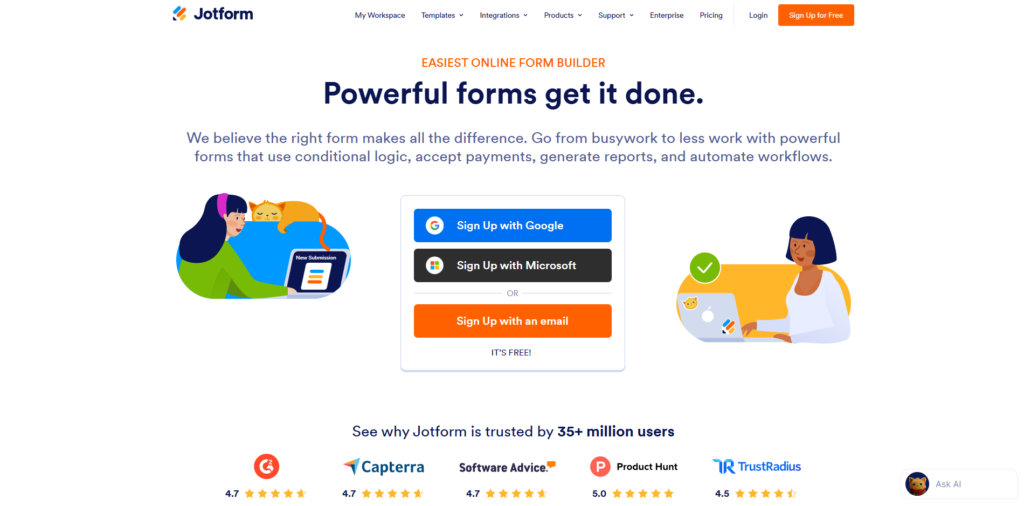
The core philosophy of the product is “ease of use meets power.” It aims to replace paper forms and disjointed digital tools with a unified system where data flows automatically from the user to your database, and eventually, to your other software stacks like Slack, Trello, or Google Workspace.
Key Features & Benefits
Having used the Jotform Enterprise and Gold plans extensively for client projects, I have had the chance to push the platform to its limits. Here are the standout features that provide real value.
The Drag-and-Drop Form Builder
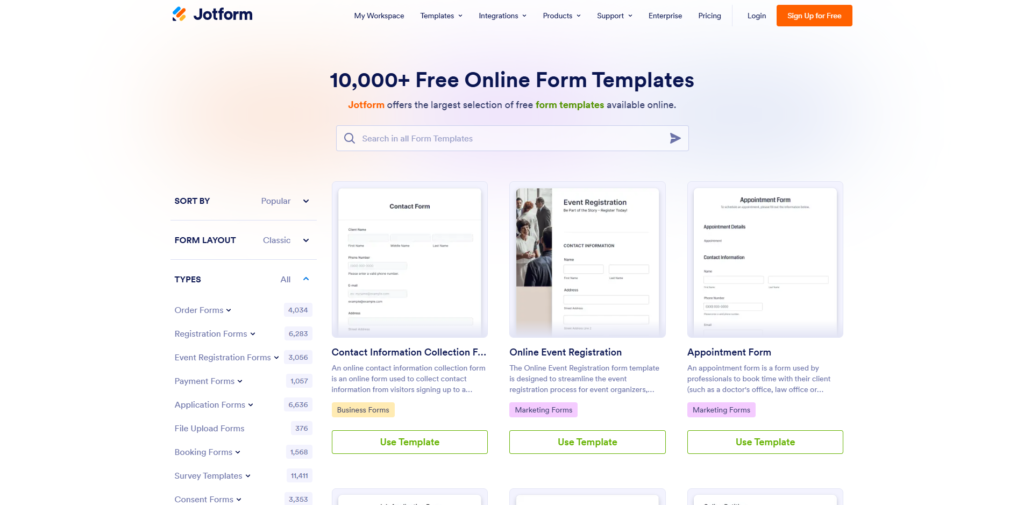
The heart of the platform is still its form builder. The interface is incredibly intuitive. You have access to over 10,000 pre-made templates, which is a lifesaver when you don’t know where to start. You simply drag elements—text boxes, dropdowns, image uploads, or widgets—onto your canvas. The logic features are particularly impressive; you can set up “conditional logic” to show or hide questions based on previous answers, making the experience smooth for the end-user.
Jotform AI Tools
This is where the platform shines for modern users. The Jotform AI Form Generator allows you to simply type a prompt (e.g., “Create a registration form for a yoga retreat that collects dietary preferences and payments”) and the AI builds the entire form, including relevant fields and design elements, in seconds. This fits perfectly into the category of best AI tools for event management and rapid deployment. It significantly reduces the “blank page” anxiety.
Jotform Tables & Report Builder
Collecting data is one thing; managing it is another. Jotform Tables essentially gives you a spreadsheet-database hybrid similar to Airtable. As soon as a user fills out a form, the data populates in the Table. You can view this data as a spreadsheet, a calendar, or cards. I use this frequently to manage content calendars and applicant tracking systems. Additionally, the Report Builder turns that data into visual charts and professional presentations automatically.
Jotform Sign
If you are paying for DocuSign or HelloSign, you might be able to cancel those subscriptions. Jotform Sign allows you to create legally binding documents with automated workflows. When I needed a freelancer contract signed, I simply converted my PDF into a Jotform Sign document. The audit trail is robust, capturing IP addresses and timestamps, which is crucial for compliance.
Store Builder & Payment Integrations
For entrepreneurs, the ability to collect money is vital. Jotform integrates with over 30 payment gateways, including PayPal, Stripe, Square, and Authorize.net. Unlike many competitors that charge an extra transaction fee, Jotform does not charge additional fees on top of what the payment processor charges. The Store Builder feature lets you create a simple app-like interface where customers can browse products and check out, which is a game-changer for small businesses without a website.
Ideal Users / Use Cases
Because the platform is so versatile, the user base is incredibly broad. However, based on my analysis, here are the groups that will get the highest ROI (Return on Investment).
Small Business Owners & E-commerce
If you sell services or limited physical products, setting up a full Shopify store might be overkill. Jotform Store Builder allows you to spin up a storefront in an hour. It is perfect for bakeries taking custom orders, photographers booking sessions, or gyms selling memberships.
HR and Recruitment Teams
I have seen HR departments save hundreds of hours using this tool. You can create an end-to-end recruitment funnel: The candidate applies (Form), the data goes to a tracking sheet (Tables), the interview is scheduled (Calendar view), and the final offer letter is sent for signature (Sign). It is a complete ecosystem.
Healthcare Providers (HIPAA Compliance)
This is a major differentiator. Jotform offers HIPAA-compliant forms on their Gold and Enterprise plans. For clinics, therapists, and hospitals needing to collect patient history or consent forms securely, this is often the go-to solution in the industry.
Educators and Non-Profits
Teachers use it for quizzes (automatically graded) and permission slips. Non-profits utilize it heavily for donation collection and volunteer registration. The 50% discount usually offered to non-profits and educational institutions makes it highly accessible.
How It Works
Getting started with Jotform is designed to be frictionless. Here is the typical workflow I follow when setting up a new project:
Step 1: Sign Up and Create You start by creating an account. You can sign up with Google or Facebook for speed. Once inside the dashboard, you click “Create Form.” You are presented with three options: Start from Scratch, Use a Template, or Import Form (which allows you to clone an existing PDF or web page).
Step 2: Customize and Configure If you choose the AI route, you type your prompt. If you choose a template, you enter the editor. Here, you customize the “Look and Feel.” You can change fonts, colors, and background images to match your brand branding perfectly. This is also where you add your integrations. For example, you might connect the form to Mailchimp so that every new entry is automatically added to your email list.
Step 3: Set Up Automation Before publishing, I always configure the “Settings” tab. Here, you set up the Autoresponder emails (the email the user gets after submitting) and Notification emails (the email you get). You can also set up the “Thank You” page to redirect users to your website or a specific landing page.
Step 4: Publish and Share Finally, you publish the form. You can embed it directly onto your website (WordPress, Wix, Squarespace, etc.) using a simple code snippet, or you can use the direct link provided. Jotform also creates a QR code for you, which is excellent for offline marketing materials like flyers or restaurant menus.
Step 5: Analyze Data As submissions roll in, you receive real-time notifications. You can then log into the dashboard to view the analytics, export the data to Excel/CSV, or manage it within Jotform Tables.
Pricing
Pricing is often the deciding factor for SaaS tools. Jotform operates on a freemium model, but understanding the limits is crucial to knowing which plan you need.
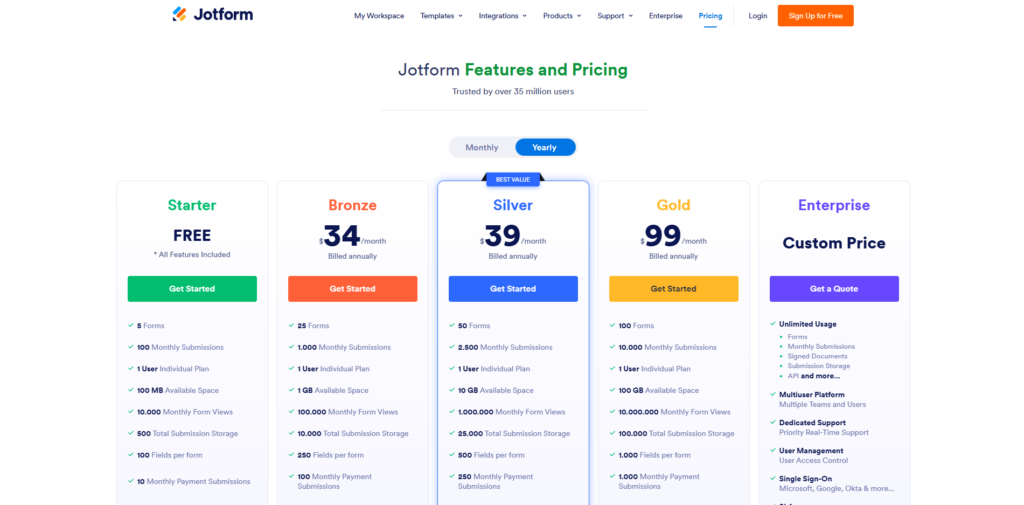
The Starter (Free) Plan: This is surprisingly generous but strictly limited by volume. You can create up to 5 forms and receive 100 monthly submissions. You have 100MB of space. This is perfect for testing the waters or for very small personal projects. However, the forms will have “Powered by Jotform” branding.
The Bronze Plan: Geared towards solopreneurs. It increases your limit to 25 forms and 1,000 monthly submissions. It removes the branding. If you are a small consultant, this is likely where you will land.
The Silver Plan: This is often considered the “sweet spot” for small businesses. It allows for 50 forms and 2,500 monthly submissions. Crucially, it offers HIPAA compliance features (though you should always check the latest updates on their pricing page as features shift).
The Gold Plan: For power users and larger teams. You get 100 forms and 10,000 monthly submissions. This tier maximizes storage space and provides the highest level of priority support.
Enterprise: For large organizations needing unlimited limits, SSO (Single Sign-On), and a dedicated server.
It is worth noting that if you are looking for AI productivity tools in 2025 that offer value, Jotform’s bundled pricing (Forms + Sign + Tables + Apps) often comes out cheaper than buying separate subscriptions for Docusign, Typeform, and Airtable.
Pros & Cons
No Jotform review would be honest without looking at the drawbacks alongside the benefits. Here is my candid assessment.
Pros (The Good Stuff) The biggest advantage is versatility; it creates a “Swiss Army Knife” effect for your business. The interface is genuinely user-friendly; the learning curve is almost non-existent for basic features. The sheer number of integrations (Zapier, Google Sheets, Slack, Zoom) means it fits into any workflow. The introduction of Jotform AI features has modernized the platform, making form generation instant. Furthermore, the security standards (GDPR, CCPA, HIPAA) are top-tier, providing peace of mind for sensitive data handling.
Cons (The Not-So-Good Stuff) The visual design of the standard forms, while customizable, can sometimes feel a bit “functional” compared to the hyper-modern, conversational style of competitors like Typeform (though Jotform does offer a “Cards” layout to mimic this). The pricing jump from Free to Bronze is reasonable, but the jump from Bronze to Silver can be steep for a small business operating on thin margins. Additionally, the Free plan’s limit of 100 submissions is a “hard” limit; if you go viral, your form gets disabled until you upgrade, which can be stressful.
FAQs
Is Jotform truly free to use?
Yes, the Starter plan is free forever, not just a trial. However, it is limited to 5 forms and 100 submissions per month. If you exceed these limits, you must upgrade. It is an excellent way to test if this is the best AI tool for data collection for your specific needs before paying.
Is Jotform secure for sensitive data?
Absolutely. Jotform uses 256-bit SSL connection, is GDPR and CCPA compliant, and offers PCI certification for payments. If you are in the healthcare sector, the Silver and Gold plans offer HIPAA compliance, which allows you to sign a BAA (Business Associate Agreement).
Can I use Jotform without a website?
Yes. You do not need a website. Jotform hosts your forms on their secure servers. You can send the link via email, SMS, or social media. You can even use Jotform Apps to bundle several forms into a mobile app that your clients can download to their phones.
How does Jotform compare to Google Forms?
Google Forms is completely free but very basic. It lacks payment integration, electronic signatures, advanced conditional logic, and design customization. Jotform is a professional-grade tool meant for business use cases where branding, logic, and payments are necessary.
Conclusion & Call-to-Action
After years of using various SaaS platforms, I can confidently say that Jotform remains one of the most reliable and feature-rich tools in the market. It has successfully transitioned from a simple form builder into a comprehensive automation platform.
Whether you are looking to streamline your HR onboarding, sell products without a complex website, or simply gather customer feedback efficiently, Jotform provides the toolkit to do it. The addition of AI productivity tools in 2025 has only cemented its position as a market leader, helping you save time on building and analyzing data.
If you are ready to stop wrestling with paper forms and disjointed software, it is time to upgrade your workflow.
Ready to transform how you collect data?
Click here to sign up for your Free Jotform Account today and experience the power of no-code automation yourself. You have nothing to lose with the Starter plan, and it might just be the productivity boost your business needs this year.