For over ten years, my professional life has been lived largely through my fingertips, translating thoughts into words across countless digital pages. My workspace has always prioritized raw efficiency—utilitarian, sharp, and focused purely on output. However, a few months ago, I stumbled upon a brand that challenged this purely functional mindset: Lofree.
Lofree is not just another tech company; they are artisans of the aesthetic workspace, crafting peripherals that blend profound nostalgia with modern, tactile performance. The moment I unboxed my first Lofree product, it wasn’t just a satisfactory exchange of money for goods—it was a refreshing moment of pure, adult joy. The weight, the retro-inspired colors, and the satisfying mechanical feedback instantly infused personality into my otherwise sterile desk setup. It was clear this brand makes tools that encourage creativity, rather than merely facilitating tasks.
As a writer deeply familiar with the nuances of various keyboards, mice, and desk accessories, this review is born out of genuine, long-term experience. I’ve put five of Lofree’s standout products through the paces of daily professional use, from drafting complex reports to late-night creative bursts. This is my sincere, unvarnished take on who Lofree is for, and how their products truly perform.
The Classic Typewriter Charm: Lofree DOT Mechanical Keyboard
The Lofree DOT is arguably the brand’s most recognizable icon—the product that perfectly encapsulates their “retro-meets-modern” philosophy. It’s an immediate conversation piece, designed with inspiration drawn directly from classic typewriters.
Hands-On Experience & Practical Use
My experience with the DOT was transformative. The defining feature is, of course, the round keycaps. They are visually delightful, but they do require a slight adaptation period; your muscle memory needs to adjust to the circular landing space rather than the usual squared edges. However, that adjustment is minor and well worth it. I opted for the tactile Gateron Brown switches, which provide a pleasing medium-firm resistance and a low-pitched thock sound that is incredibly satisfying and non-disruptive.
For long writing sessions, the DOT felt surprisingly ergonomic. I found myself making fewer errors once I adapted, and the keyboard’s heavy, solid base ensured zero movement on my desk, contributing to a premium feel. The adjustable backlight is a soft, uniform glow that complements the retro aesthetic perfectly. Using the DOT turns the act of typing into an engaging sensory ritual, making it a powerful tool against creative fatigue.
Advantages (Pros)
- Aesthetics: Exceptional vintage design that instantly elevates the mood and look of any office.
- Tactile Feedback: High-quality Gateron switches offer a satisfying and responsive typing feel.
- Multi-Device Connectivity: Seamless switching between my desktop, tablet, and phone via Bluetooth.
- Build Quality: Solid construction and weighted base prevent slippage and contribute to longevity.
- Keyword Focus: Excellent for users searching for an “aesthetic mechanical keyboard” with true character.
Disadvantages (Cons)
- Initial Learning Curve: The round keycaps may cause a handful of typos until your fingers adjust fully (usually 1-2 days).
- Portability: While wireless, its weight and robust size make it less ideal for daily hauling than smaller models.
- Pricing: Positioned in the premium market segment, which requires a higher initial investment.
Who is the DOT Best suited For?
The Lofree DOT is the perfect fit for Writers, Content Creators, and Creatives who spend significant time typing and want their primary tool to be an source of inspiration. If you cherish nostalgia, enjoy tactile feedback, and are willing to pay for a premium, statement centerpiece for your desk, the DOT is unbeatable.

The Modern Minimalist: Lofree FLOW Low Profile Mechanical Keyboard
The Lofree FLOW represents the other end of the spectrum: a sleek, modern, and highly engineered device focused on speed and subtlety. It utilizes the innovative, custom-designed Kailh low-profile switches which allow for an astonishingly thin keyboard profile.
Hands-On Experience & Practical Use
My shift to the FLOW was prompted by a need for a quiet, high-speed typing solution for a co-working space. I chose the linear “Ghost” switches. The difference is immediately apparent: the key travel is minimal, making it feel fast, precise, and whisper-quiet. The low-profile design, combined with the all-aluminum alloy chassis, gives it a substantial, yet incredibly thin and refined presence.
The typing experience on the FLOW is buttery smooth. It feels less like a typewriter and more like a high-performance, precision instrument. Because of the shorter travel, I noticed my finger strain decreasing during prolonged typing marathons. It’s the perfect blend of a laptop keyboard’s speed and a mechanical keyboard’s satisfying feel, making it an ideal choice for high-volume data entry and coding as well as writing.
Advantages (Pros)
- Ultra-Thin & Premium: The sleek aluminum body is highly durable and undeniably stylish.
- Quiet Operation: Perfect for office environments or shared living spaces due to minimal noise output.
- High Speed: The short key travel allows for extremely fast and accurate typing.
- Portability: Its slim profile makes it the ultimate “portable mechanical keyboard” for travel and remote work.
Disadvantages (Cons)
- Reduced Tactility: Mechanical enthusiasts who love deep, clacky key presses might find the low-profile feel less satisfying.
- Limited Keycap Customization: Due to the specialized switches, keycap replacement options are limited compared to standard mechanical boards.
Who is the FLOW Best Suited For?
The Lofree FLOW is designed for Digital Nomads, Modern Minimalists, and Corporate Professionals. If you need the speed and responsiveness of a mechanical board but require a highly aesthetic, quiet, and thin profile for on-the-go or streamlined office use, the FLOW is your sophisticated answer. It is a highly optimized tool for the search term “best low profile mechanical keyboard”.
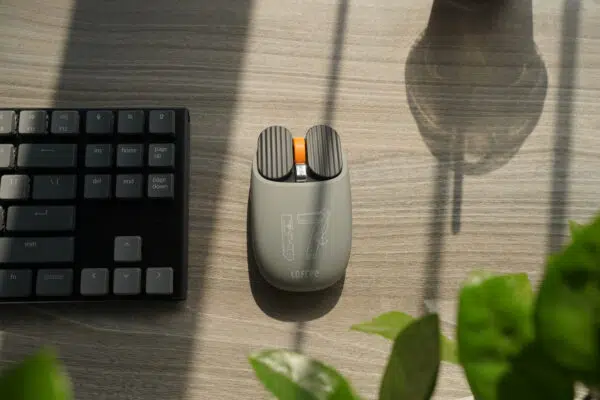
The Retro Companion: Lofree Maus Wireless Mouse
A keyboard needs a mouse, and the Lofree Maus brings the same playful, vintage sensibility to the clicking and scrolling experience.
Hands-On Experience & Practical Use
The Maus has a distinct, classic computer mouse shape but with updated ergonomics that fit comfortably in a full palm grip. The aesthetic is what truly sells it—I chose a model with a translucent shell, allowing a peek at the internal circuit boards, a nod to 90s-era “see-through” tech.
Functionally, it’s a robust and reliable mouse. The click sound is notably dampened, making it quieter than most of my previous standard mice. The scroll wheel offers a satisfying, notched resistance that makes navigating documents and web pages precise. While I am not a competitive gamer, the adjustable DPI (up to 3600 DPI) provided ample accuracy for graphic editing and detailed document mark-up. It connected instantly and reliably via both Bluetooth and the 2.4G receiver, offering a stable experience essential for focused work.
Advantages (Pros)
- Design Harmony: Visually complements Lofree keyboards, completing the desk ecosystem.
- Comfort: Excellent ergonomic shape suitable for long working hours.
- Quiet Clicks: Low operational noise is ideal for focused or shared workspaces.
- Reliable Dual-Mode Connectivity: Ensures stable performance across different devices.
Disadvantages (Cons)
- No Advanced Features: Lacks the programmable macro buttons required by specialized power users (e.g., video editors or competitive gamers).
- Weight: It is heavier than some ultralight gaming mice, which might not appeal to users who prefer minimal mass.
Who is the Maus Best Suited For?
The Lofree Maus is for the Everyday Professional and the Design Enthusiast. If you are already invested in the Lofree ecosystem or simply want a solid, comfortable, and distinctly styled mouse that is a step above basic office peripherals, the Maus is an essential, reliable choice.
The Ultra-Compact Statement: Lofree 1% Mechanical Keyboard
The Lofree 1% is perhaps the most audacious design in their lineup. It is a stunning, minimalist 68-key keyboard that boldly embraces the ultra-compact form factor, making a huge visual statement by taking up minimal desk space.
Hands-On Experience & Practical Use
What captivated me about the 1% was its transparent, almost crystalline acrylic body. When the RGB backlighting is on, the keyboard transforms into a glowing piece of art, scattering light beautifully across the desk. It forces a deliberate workflow change, as dedicated function keys, the Numpad, and some navigation keys are accessed via the function (Fn) layer.
This compact design requires discipline; it is not for the user who relies heavily on dedicated arrow or home/end keys without looking. However, for deep focus writing where you rarely lift your hands from the main key clusters, it is magnificent. The mechanical switches felt premium and responsive, delivering a smooth, quick typing action suitable for high-speed drafting. The commitment to this size frees up incredible amounts of desk real estate, making the workspace feel cleaner and less cluttered.
Advantages (Pros)
- Visual Impact: The clear, translucent design is a guaranteed showstopper and centerpiece for an “aesthetic desk setup.”
- Space Optimization: Minimal footprint is perfect for small desks or users who need vast mouse space.
- Build Quality: Excellent construction quality despite the unique acrylic shell.
- Portability: Exceptionally light and easy to transport due to its reduced size.
Disadvantages (Cons)
- Functionality Learning Curve: The condensed layout requires time to memorize the FN key combinations for certain functions.
- Maintenance: The clear acrylic body is prone to showing fingerprints and dust, requiring more frequent wiping.
Who is the 1% Best suited For?
The Lofree 1% targets the Aesthetic-Driven Minimalist, the Casual Coder, or the Secondary Keyboard User. If your workflow can handle a 65% layout and you want a visual statement piece that screams modern design and efficiency, this compact, translucent wonder is an outstanding choice.
The Auditory Anchor: Lofree OE909 Wireless Speaker
Lofree extends its design philosophy beyond input devices with accessories like the OE909 Wireless Speaker, a delightful piece of “retro tech” that brings charming acoustics to the workspace.
Hands-On Experience & Practical Use
The OE909 looks like a tiny, vintage hi-fi component or an old-school computer monitor, complete with a small, functional retro display screen. Its design is impeccable, sitting perfectly alongside their keyboards. I was most curious about the sound quality, and I was pleasantly surprised.
The speaker delivers a sound profile that is warm, rich, and well-balanced, ideal for background music, podcasts, and video conferencing. The bass is punchy without being overwhelming, and the clarity of spoken word is excellent. It creates a cozy, enveloping auditory atmosphere necessary for long hours of focused work. While it won’t replace a high-end stereo system for critical listening, as a dedicated desk speaker, it provides premium quality audio that perfectly complements the vintage aesthetic.
Advantages (Pros)
- Unique Design: The vintage radio/monitor aesthetic is highly charming and visually appealing.
- Warm Sound: Excellent sound quality for background listening, creating a cozy atmosphere.
- Display Feature: The small, functional screen is a fun, nostalgic touch.
- Integration: Perfectly completes a unified Lofree desktop theme.
Disadvantages (Cons)
- Volume Capacity: It is strictly a desktop speaker; it lacks the power to fill large rooms.
- Limited Customization: Basic controls for volume and playback; no advanced EQ settings are available.
Who is the OE909 Best Suited For?
The OE909 is a fantastic accessory for Remote Workers, Music Enthusiasts, and Lofree Collectors who want a desktop speaker that prioritizes delightful design and delivers high-quality, non-disruptive background audio. It turns the simple act of listening into a more intentional, stylish experience.

Final Verdict: The Joy of Typing Reimagined
Lofree is more than a brand; it’s a philosophy. They successfully merge the satisfying, tangible feedback of mechanical devices with captivating, nostalgic design, reminding us that the tools we use daily should be a source of pleasure, not just utility.
My experience across these five products confirms one thing: the investment in Lofree is an investment in your productivity and your well-being.
- If you crave the classic feel and want a bold centerpiece, choose the DOT.
- If you demand speed, silence, and an incredibly thin profile, the FLOW is your professional ally.
- If you prioritize a clean, uncluttered desk and a striking visual effect, the 1% will impress.
These products consistently demonstrate superior build quality, meticulous design detail, and a commitment to making the workspace charming. While they occupy a premium price bracket, the longevity and the daily sensory satisfaction they provide easily justify the cost for anyone spending significant time at a desk. They successfully cater to the growing search segment of “best retro mechanical keyboards” without compromising on modern performance.