We have all experienced the intense frustration of traditional AI video generation. You spend hours writing the perfect prompt, only to receive a choppy, four-second clip where the character’s face melts halfway through. If you are producing commercial content, social media series, or marketing campaigns, these disjointed micro-clips are practically useless.
You need a tool that understands narrative flow, maintains visual consistency, and can generate complete storylines without requiring a dozen different software subscriptions. This is exactly the gap in the market that MagicLight AI claims to fill. Promising the ability to turn simple text into fully animated videos up to 30 or even 50 minutes long, it sounds almost too good to be true.
As a content writer and digital marketer who relies heavily on AI to streamline video production and TVC storyboarding, I needed to see if this platform could actually deliver. I have spent the last few weeks pushing this tool to its limits, testing its character consistency, lip-syncing, and overall rendering quality.
In this comprehensive review, we will dive deep into everything you need to know about this platform. From its standout features to its pricing structure, I will help you decide if you should try MagicLight AI for your next big video project.
Overview of MagicLight AI
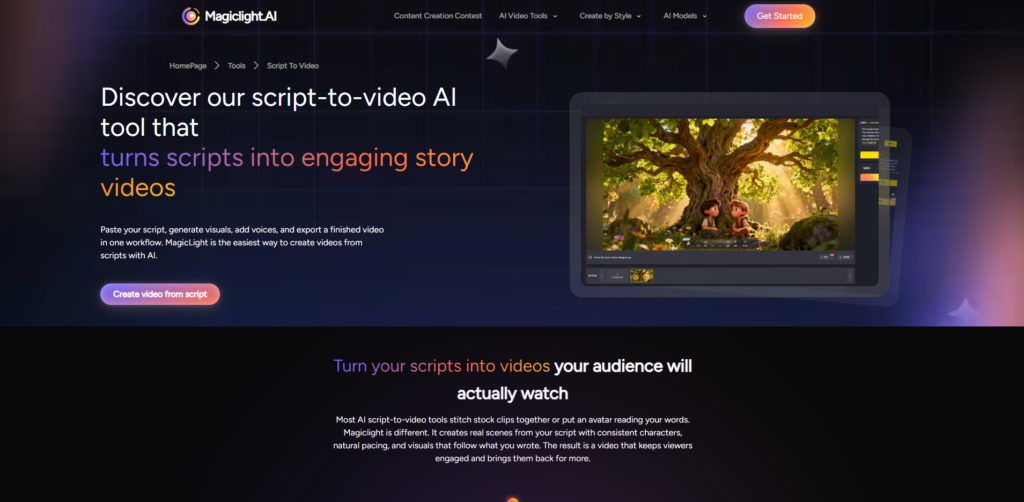
At its core, MagicLight AI is not just another basic text-to-video generator; it is a complete, all-in-one AI movie maker. While competitors limit you to generating single, disconnected scenes, this platform is specifically engineered for long-form content creation. It seamlessly bridges the gap between scriptwriting, animation, voiceover, and final editing.
The technology driving the platform focuses heavily on structural coherence and scene-based generation. When you input a story or a script, the AI does not just guess the visuals; it creates a structured storyboard. This allows creators to build multi-scene animations where the narrative actually makes sense from beginning to end.
Furthermore, it boasts an impressive cross-platform presence. Whether you prefer working on a desktop web browser for complex edits or using their dedicated iOS and Android apps for on-the-go creation, the ecosystem is highly accessible. It completely removes the technical barriers of traditional 3D animation.
Ultimately, the main goal of this AI video generator is to empower solo creators, marketers, and educators to produce studio-quality animated series without needing a massive budget or a team of professional animators. It is about turning a blank page into a broadcast-ready video in record time.

Key Features & Benefits
The landscape of AI tools is incredibly crowded, so a product needs highly specific, powerful features to stand out. After integrating this platform into my daily content workflow, several core functionalities proved to be absolute game-changers.
Unprecedented Long-Form Generation
The most significant advantage of using this platform is its ability to bypass the standard limitations of AI video. You are no longer restricted to 5-second or 10-second outputs. You can actually generate smooth, coherent videos that stretch up to 30 or 50 minutes. This is revolutionary for creators making full podcast visuals, children’s stories, or extended educational courses.
Ultra-Consistent Character Profiles
If you have ever tried to make an AI character appear in two different scenes, you know how easily their appearance changes. MagicLight AI solves this with an ultra-consistent character engine. You can upload reference photos to create a “base profile,” ensuring your protagonist’s face, clothing, and style remain identical across hundreds of different camera angles and scenes.
Director-Level Camera and Lighting Control
You do not have to settle for the AI’s default composition. The platform features an intuitive interface that gives you director-level control over the final output. You can fine-tune camera angles, trigger cinematic zooms, add boom-style motion effects, and adjust lighting cues to match the emotional tone of your script.
Real-Time Lip Sync and Dynamic Voiceovers
A great video needs great audio, and syncing the two is usually a nightmare. This tool features a built-in AI voice cloning and generation system that automatically syncs the audio with the dynamic lip movements of your characters. The expressions match the tone of the voice, eliminating the “uncanny valley” robotic feel that plagues many other platforms.
All-in-One Built-in Editor
Instead of exporting your raw AI clips into Premiere Pro or CapCut, you can handle everything internally. The built-in AI video editor allows you to adjust transitions, control the pacing of the narrative, and automatically generate highly accurate, dynamic subtitles. This drastically reduces the friction in your production pipeline.
Ideal Users / Use Cases
While the platform is incredibly versatile, certain types of creators and professionals will extract the maximum ROI from this tool. If you fall into any of the following categories, you need to sign up for MagicLight AI immediately.
Faceless YouTube and TikTok Creators
If you run a channel focused on animated stories, historical recaps, or Reddit tales, this is your ultimate weapon. You can generate a 10-minute animated video complete with voiceovers and captions in a fraction of the time it would normally take. The consistency ensures your channel builds a recognizable visual brand.
Authors and Storytellers
Writers often struggle to visualize their work without hiring expensive illustrators. With the dedicated “novel to video” feature, authors can input chapters of their books and watch them transform into animated audiobooks. It is an incredible way to create promotional trailers for upcoming book launches or serialize your fiction on video platforms.
Digital Marketers and Creative Agencies
In the agency world, pitching a TV commercial or a digital ad campaign requires compelling visual mockups. Instead of spending days drawing static storyboards, marketers can use this tool to generate animated, fully voiced animatics. It allows you to present a vivid, highly polished concept to clients, significantly increasing your chances of winning the pitch.
Educators and Online Course Instructors
Keeping students engaged with static slides is increasingly difficult. Educators can transform their lesson plans into captivating animated content. By turning complex subjects into visual stories, teachers can drastically boost viewer retention and make their educational materials much more accessible.
How It Works
One of the most appealing aspects of this platform is that you do not need any prior video editing or animation experience. The workflow is highly intuitive and designed to guide you from concept to completion in just a few logical steps.
Step 1: Ideation and Scripting
You begin by choosing your input method. You can paste a fully written script, upload a story, or simply type a basic text prompt describing your vision. If you are short on ideas, the AI can even assist in fleshing out your narrative structure, breaking it down into manageable scenes.
Step 2: Character and Style Selection
Next, you define the visual identity of your project. You can choose from over 20 distinct artistic styles, ranging from 3D Pixar-like animation to 2D anime or realistic cinematic looks. This is also where you upload your character references or design new consistent avatars using the built-in AI image maker.
Step 3: Generation and Direction
Once your parameters are set, the AI generates the foundational video. Here, you step into the director’s chair. You can review each scene, adjust the camera movements, change the lighting, and regenerate any specific clips that do not perfectly align with your vision.
Step 4: Audio, Subtitles, and Export
Finally, you add the finishing touches. You can select an AI voiceover, let the engine automatically lip-sync the dialogue, and generate stylish, animated captions. Once you are satisfied with the pacing and transitions, you hit export. You will receive a polished, high-definition video ready for immediate publication.
Pricing
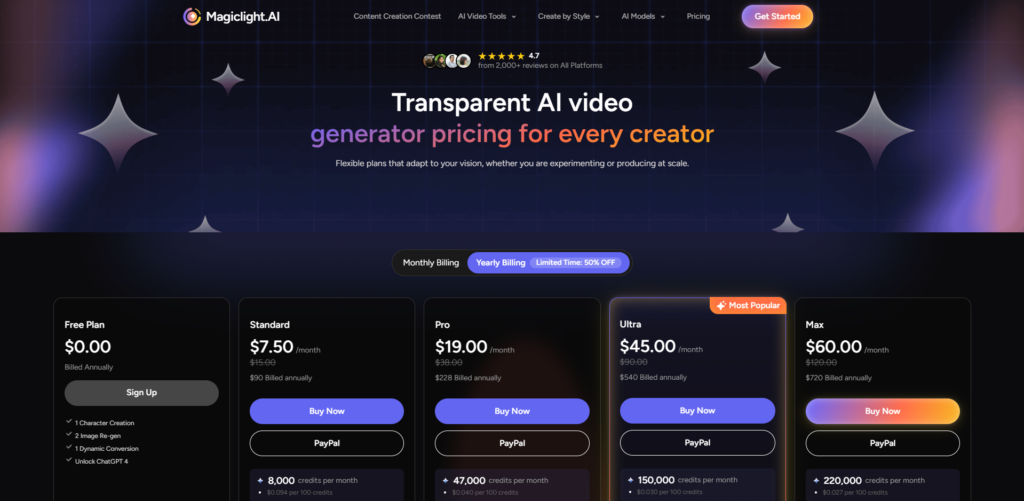
When evaluating any SaaS product, the cost-to-value ratio is a critical factor. Fortunately, the pricing structure here is both transparent and highly competitive, especially when compared to the cost of traditional video production.
The platform offers a very generous Free Plan to get you started. New users typically receive a bonus of 300 creation credits and the ability to export a free 6-minute HD video with dynamic captions and watermark-free results. This is the perfect risk-free way to test the platform’s capabilities before committing your budget.
For regular creators, there are multiple subscription tiers, including Standard, Plus, Pro, and Ultra plans, available on both monthly and yearly billing cycles. While prices vary by region and platform (iOS vs. Web), the basic paid plans start at highly accessible rates. These premium tiers unlock massive credit limits, allowing for the generation of those massive 50-minute epics.
Pros & Cons
To provide a balanced perspective, it is important to look at both the strengths and the limitations of the platform. No tool is perfect, but understanding these nuances will help you optimize your workflow.
The biggest pro is undeniably the ability to generate incredibly long, coherent videos with unmatched character consistency. It eliminates the need to juggle multiple software subscriptions for voices, editing, and animation. The fact that it offers a fully functional mobile app for both iOS and Android also gives it a massive edge over web-only competitors, allowing for true on-the-go creation.
On the downside, rendering a massive 30-minute video natively through AI does take time; you cannot expect instant results for feature-length outputs. Additionally, while the interface is user-friendly, mastering the “director-level” controls like camera panning and lighting requires a slight learning curve. Finally, your final output is heavily dependent on the quality of your initial prompt, so writing detailed descriptions is a necessary skill.
FAQs
Is there a steep learning curve for beginners?
Not at all. The interface is designed to be highly intuitive. While advanced features like custom camera angles take a bit of practice, a complete beginner can successfully generate a high-quality video using just simple text prompts within their first ten minutes on the platform.
Does the platform support languages other than English?
Yes, it offers robust multi-language support. The AI voiceover and lip-syncing engine can generate natural-sounding speech and accurate subtitles in various languages, making it an excellent tool for creators looking to reach a global audience or localize their content.
Can I use the videos for commercial purposes?
Generally, videos created on paid subscription tiers come with commercial rights, allowing you to use them for YouTube monetization, client projects, or advertising campaigns. However, it is always recommended to review their official Terms of Service to ensure your specific use case is fully covered.
How does the character consistency actually work?
The AI uses a proprietary engine that locks in the specific facial features, clothing, and color palettes of your designated character. By setting a “base profile,” the system references this master file every time it generates a new scene, preventing the visual drift common in older AI models.
Conclusion & Call-to-Action
After extensively testing the platform, it is clear that this is not just a gimmick; it is a fundamental shift in how we approach digital storytelling. By solving the most painful bottlenecks of AI video—short clip limits and inconsistent characters—it has created a viable pipeline for serious content creators.
Whether you are an agency marketer trying to pitch a bold new concept, or a YouTuber looking to automate a high-quality animation channel, this tool provides immense value. It saves you time, cuts down on expensive software costs, and ultimately allows your creativity to scale without technical friction.
If you are ready to stop fighting with clunky AI tools and start directing your own animated series, there is no better time to start. Click here to try MagicLight AI for free and claim your bonus creation credits to bring your first script to life today!