If you have spent any amount of time working with generative AI, you already know the biggest frustration: consistency. You write a brilliant prompt, generate a stunning character or product, and then spend the next five hours desperately trying to get the AI to recreate that exact same subject in a different pose or a specific 16:9 cinematic framing. Standard AI image generators are amazing for one-off ideas, but they are notoriously terrible at maintaining strict visual continuity. They tend to hallucinate details, change clothing without being asked, or completely ignore the subtle nuances of your original reference image.
This exact pain point is what led me to explore Scenario AI. Billed as a platform designed specifically for creating custom, style-consistent AI models, it promises to give control back to the creator. Instead of rolling the dice with generic algorithms, you train an AI on your own specific art style, character, or product.
In this comprehensive Scenario AI review, we are going to dive deep into what this platform actually does, who it is built for, and whether it is truly worth integrating into your professional workflow. If you are looking for a way to scale your digital asset production without losing your unique visual identity, keep reading to see if this is the tool you have been waiting for.
Overview of the Scenario AI Platform
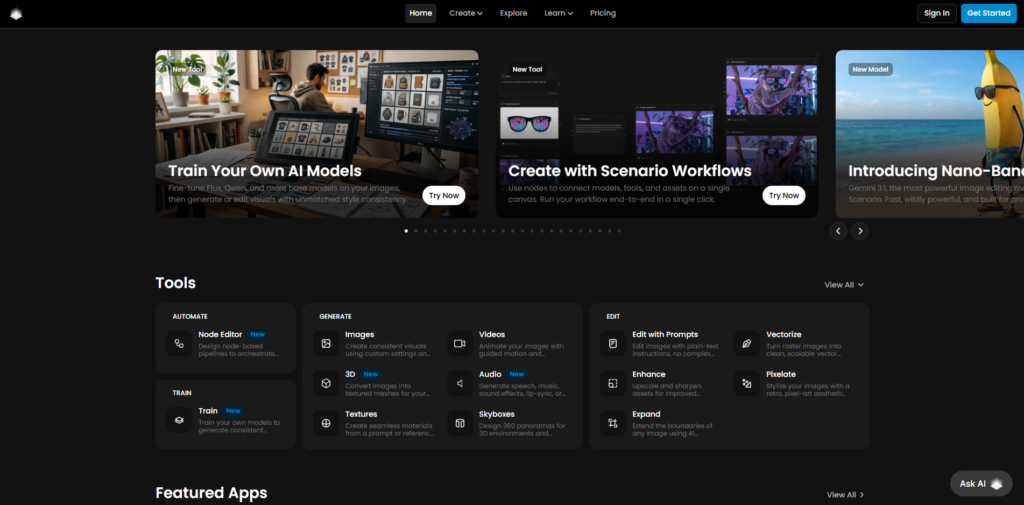
Scenario AI is a specialized Software-as-a-Service (SaaS) platform built around a very specific goal: allowing professionals to train their own custom AI image generators. While tools like Midjourney or DALL-E offer a massive, generalized database of knowledge, Scenario allows you to create a localized, highly specific “brain” that only knows your art style or your specific project requirements.
The core technology leverages advanced stable diffusion models, but the magic lies in the user interface and the training infrastructure. You do not need to be a machine learning engineer to use it. By uploading a small batch of reference images—whether they are character sketches, 3D renders, or product photos—you can teach the AI to understand exactly what you want.
Once your custom model is trained, you can generate thousands of new assets using text prompts, safe in the knowledge that the output will perfectly match your established aesthetic. This level of precise control is revolutionary for game developers, creative agencies, and digital marketers who rely on strict brand guidelines and cannot afford random AI hallucinations.
Key Features & Benefits of Scenario AI
When evaluating any SaaS tool, the feature set needs to solve real-world workflow bottlenecks. Here is a breakdown of what makes the Scenario AI platform stand out from the crowded generative AI market.
Custom Model Training (Fine-Tuning)
This is the undisputed crown jewel of the platform. You can upload a dataset of your own images—usually between 15 to 50 high-quality references—and Scenario will train a bespoke AI model based on that data. This means if you have a specific character design, the AI learns their exact facial structure, preferred color palette, and vibe. When you later write a text prompt to create an image, the AI relies on your reference data rather than generic internet scrapings. It eliminates the struggle of trying to perfectly describe visual nuances with words.
Advanced Composition Control
One of the most frustrating aspects of standard AI is getting the composition right. You might want a character sitting on a modern sofa facing directly forward, but the AI keeps giving you side profiles. Scenario AI integrates advanced tools like ControlNet and Image-to-Image generation. This allows you to upload a basic sketch or a pose reference, forcing the AI to stick to that exact structure. You can easily dictate the aspect ratio, ensuring your outputs are perfectly framed for 16:9 video assets or 9:16 social media campaigns without losing the core subject.
Pixel-Perfect Consistency
Because the AI is trained on your specific data, it stops making unwanted creative decisions. If your reference images feature a character with a very specific modern outfit, you do not need to waste prompt space describing those clothes over and over again. You simply focus your text prompts on the action or the background—like a sudden black hole appearing behind the subject—and the custom model knows to keep the character’s core design identical. This strict adherence to your reference material saves countless hours of generating and discarding bad outputs.
API Integration for Automation
For larger teams and developers, Scenario AI offers a robust API. This means you can integrate their generation engine directly into your own software, games, or marketing dashboards. If you run an agency or build apps, you can automate the creation of assets on the fly, feeding dynamic prompts into your custom models without ever opening the Scenario web interface.
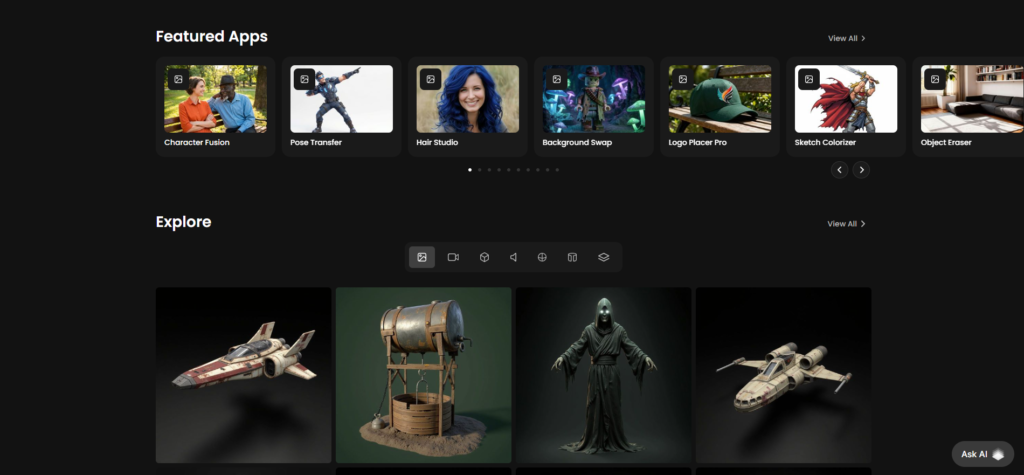
Ideal Users / Use Cases
Scenario AI is not just a toy for casual enthusiasts; it is a professional-grade tool designed for specific industries.
Game Developers and Studios
Indie developers and massive studios alike use this tool to generate game assets at scale. Whether you need 50 different variations of a health potion, background environments in a specific isometric pixel-art style, or consistent character portraits for an RPG, training a model on your game’s concept art drastically speeds up production.
Creative Agencies and Affiliate Marketers
If you run advertising campaigns, you know how expensive and time-consuming custom photography or illustration can be. Marketers can train a model on a specific product—like a brand of perfume or an energy drink. From there, they can generate endless ad creatives, placing that exact product into various lifestyle scenes, futuristic backgrounds, or seasonal settings without ever booking a photo shoot.
Web Designers and UI/UX Professionals
When building a brand identity or a website for a client, consistency is key. Designers can use this platform to generate custom icons, hero illustrations, or blog post thumbnails that all look like they were drawn by the exact same artist, ensuring a cohesive user experience across the entire digital ecosystem.
How It Works: The Workflow
Using Scenario AI is surprisingly intuitive, even if you have no background in coding or machine learning. The workflow is divided into a few straightforward steps.
Step 1: Curating Your Training Data
The quality of your custom AI model is entirely dependent on the images you feed it. You start by gathering a collection of reference images. If you are training a style model, you might upload 20 different illustrations that share the same color grading and line work. If you are training a character model, you upload images of that character from multiple angles. The platform provides clear guidelines on how to crop and prepare your data for the best results.
Step 2: Training the Engine
Once your dataset is uploaded, you initiate the training process. You give your model a name and a specific trigger word. The Scenario servers then take over, analyzing the structural and stylistic elements of your images. This process usually takes anywhere from 20 minutes to an hour, depending on the complexity and size of your dataset.
Step 3: Prompting and Iterating
After the model is trained, the fun begins. You jump into the generation interface, select your new custom model, and start typing text prompts. Because the heavy lifting is already done by the model’s training, your prompts can be much more concise. You use your trigger word, define the scene, and let the AI do the rest. You can further refine the output by uploading new reference images to guide the specific pose or lighting of the new generation.
Step 4: Upscaling and Exporting
Once you generate an image that perfectly fits your vision, Scenario AI provides built-in tools to upscale the resolution, remove backgrounds, or subtly tweak specific areas. You can then download the assets in high resolution, ready to be dropped straight into your game engine, video editor, or web design project.
Pricing Options
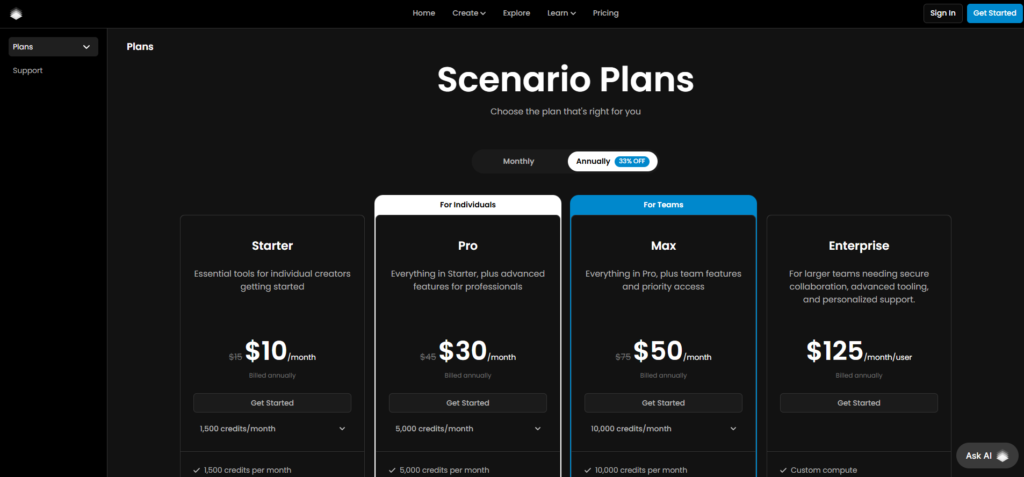
Scenario AI offers a tiered pricing structure that accommodates everyone from solo hobbyists to enterprise teams.
They provide a generously structured Free Tier (often based on a daily or monthly credit limit) that allows you to test the interface, generate images using public models, and get a feel for the workflow. This is highly recommended before committing to a paid plan.
For professionals, the paid subscriptions are where the real power is unlocked. The Starter/Pro Plans (typically ranging from $20 to $100+ per month depending on your usage needs) give you the ability to train multiple private custom models, access faster generation times, and utilize advanced features like ControlNet and bulk exports. They also offer dedicated API Plans for businesses looking to integrate the technology directly into their own software ecosystems, with pricing scaling based on generation volume. (Note: Pricing structures in SaaS change frequently, so it is always best to check their official pricing page for the most current rates).
Pros & Cons
Like any powerful tool, Scenario AI has its distinct advantages and a few areas where users need to temper their expectations.
The Pros:
The absolute biggest advantage is the unparalleled consistency it provides. The ability to lock in a specific art style or character design completely changes how you approach AI generation. The user interface is clean, professional, and built specifically with asset management in mind, keeping your projects organized. Furthermore, the robust API access and the ability to combine custom models with structural references (like pose control) give it a massive edge over consumer-grade AI bots.
The Cons:
The primary drawback is the learning curve associated with training data. If you upload poor-quality, inconsistent reference images, your custom model will produce terrible results; it requires you to be meticulous in step one. Additionally, because it is a cloud-based SaaS, you are reliant on their servers and an internet connection to work, which might deter users who prefer running models locally on their own high-end hardware. Finally, heavy users might find the credit-based generation system restrictive if they are rapidly prototyping thousands of images a day.
Frequently Asked Questions (FAQs)
Can I use the images I generate for commercial projects?
Yes. Assets generated using Scenario AI on their paid tiers are generally fully cleared for commercial use. This means you can confidently use them in games you intend to sell, marketing campaigns, and client projects without worrying about complex licensing fees.
How many images do I need to train a good custom model?
While you can technically train a model on as few as 5 images, the sweet spot for a highly versatile and accurate model is typically between 15 and 30 high-quality, varied images. The more diverse the angles and contexts in your training data (while maintaining the core subject or style), the smarter your model will be.
Is this better than just using Midjourney or DALL-E?
It depends entirely on your goal. If you want to generate a single, random, beautiful piece of concept art, Midjourney is fantastic. However, if you need to generate that exact same concept art character in 50 different animations, or you need to place a specific product into different lifestyle shots for an ad campaign, Scenario AI is vastly superior due to its custom training capabilities.
Do I need to know how to code to use the platform?
Not at all. The web interface is entirely visual and user-friendly. The only time you would need coding knowledge is if you specifically want to integrate the Scenario AI generation engine into your own custom app or game using their API.
Conclusion & Call-to-Action
The era of fighting with text prompts to achieve visual consistency is fading. Scenario AI represents the next logical step in generative artificial intelligence: moving away from randomized novelty and toward professional, reliable asset production.
By allowing you to train private models based on your exact aesthetic, it solves the “hallucination” problem that plagues so many other platforms. Whether you are an affiliate marketer needing endless ad creatives, a designer seeking cohesive web assets, or a developer building a game world, this tool provides the precise control necessary to execute your vision without compromise.
Stop wasting hours trying to force generic AI to understand your brand. Take control of your creative pipeline today.
Ready to train your first custom AI model and experience true consistency?
Click here to sign up for Scenario AI and start creating your own professional assets today!