Planning an event—whether it’s a high-stakes corporate gala, a massive wedding, or an intimate workshop—often feels like juggling flaming torches while riding a unicycle. I have been there. The endless spreadsheets, the “I didn’t get the invite” emails, and the chaos of dietary restrictions can break even the most organized planner.
For years, the event management SaaS market was polarized: you either had clunky, ugly enterprise software or overly simple, free tools that lacked functionality. Enter RSVPify.
In this detailed review, I’m going to break down my experience using RSVPify, a tool that promises to bridge the gap between aesthetic appeal and robust data management. If you are looking for an online RSVP tool that can handle everything from ticket sales to seating charts, keep reading. We will explore if this platform is worth your investment and how it stacks up against the competition.
Overview: What is RSVPify?
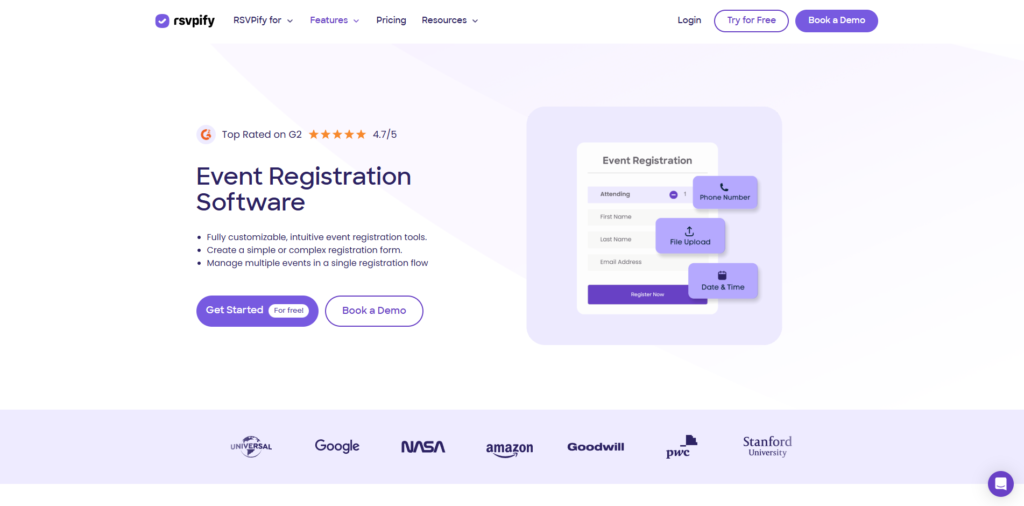
At its core, RSVPify is a cloud-based event management software designed to streamline the entire lifecycle of an event. Unlike niche platforms that focus solely on weddings or solely on corporate ticketing, RSVPify positions itself as a hybrid solution. It is versatile enough for a bride planning a destination wedding, yet powerful enough for a Fortune 500 company hosting a multi-day conference.
Launched initially as a better way to handle wedding RSVPs, the platform has evolved into a full-fledged SaaS powerhouse. It offers end-to-end event management, moving beyond simple “Yes/No” responses to handle complex logic, payment processing, mass email communications, and on-site check-ins.
What makes RSVPify stand out in the crowded SaaS market is its focus on branding. Most tools force you into their design ecosystem, but RSVPify allows for a level of customization that feels like a bespoke website.

Key Features & Benefits
After using the platform for several different event types, I found the feature set to be incredibly deep. Here is a breakdown of the standout features that make RSVPify a top contender in the market.
Advanced RSVP Logic and Registration
The “Secondary Events” feature is a game-changer. Most event registration platforms treat an event as a single entity. However, if you are hosting a wedding, you might have a rehearsal dinner (for VIPs only) and a morning-after brunch. If you are hosting a conference, you might have breakout sessions or VIP cocktail hours.
RSVPify allows you to create these sub-events and control exactly who sees them. You can upload a guest list and tag specific people as “VIP,” ensuring only they can RSVP to the exclusive dinner. This eliminates the awkwardness of uninvited guests stumbling upon private event details.
Fully Customizable Event Websites
You don’t need to know how to code to build a stunning landing page here. The drag-and-drop builder is intuitive, but the real power lies in the customization. You can upload custom fonts, use CSS (if you are tech-savvy), and completely remove the RSVPify branding on higher-tier plans. This white-label capability is essential for corporate clients who want the event website to look like an extension of their corporate brand.
Integrated Seating Charts
If you have ever used sticky notes on a poster board to plan seating, you know the pain. RSVPify has a built-in drag-and-drop seating chart tool. It pulls directly from your confirmed guest list. You can design the floor plan, place guests at tables, and manage meal preferences all in one view. This feature alone saves hours of manual cross-referencing.
Email Communication Suite
The platform includes a robust email marketing engine. You can send Save-the-Dates, formal invitations, and QR codes for check-in. The benefit here is the data integration: you can see who opened the email, who bounced, and who hasn’t clicked yet. You can then schedule automated reminders specifically for those who haven’t responded, without annoying the guests who already did.
Ticket Sales and Payments
For those hosting paid events, RSVPify integrates with Stripe and PayPal. You can sell tickets, collect donations, or sell merchandise. The platform supports various currencies and tax settings, making it viable for international events. Unlike some competitors that hold your money until after the event, these integrations deposit funds directly into your account.
Ideal Users: Who is RSVPify For?
While anyone can use the tool, my testing suggests it provides the highest ROI for three specific groups of users.
Corporate Event Planners
If you are managing brand activations, holiday parties, or conferences, the ability to white-label the experience is crucial. Corporate planners will appreciate the data exports and the ability to ask custom registration questions (e.g., “Which breakout session do you want to attend?”). The check-in app also adds a layer of professionalism at the door.
Wedding Couples and Planners
For weddings, specifically complex ones with multiple events (Welcome Drinks, Ceremony, Reception, Brunch), this is arguably the best tool on the market. The ability to group households and control “plus ones” prevents the nightmare of uninvited guests. It offers a level of elegance that free forms like Google Forms simply cannot match.
Non-Profits and Galas
Fundraising events require a mix of ticketing and guest management. RSVPify allows non-profits to sell tables, manage VIP donors, and collect dietary info simultaneously. The streamlined check-in process helps volunteers manage the door efficiently, ensuring donors have a smooth experience from the moment they arrive.
How It Works: A Walkthrough
To give you a realistic idea of the workflow, let me walk you through the process of setting up an event on RSVPify.
Step 1: Event Setup and configuration
Once you create your account, you start by selecting your event type. The dashboard is clean and modern. You enter your event name, dates, and location. This is where you configure the “General Settings,” such as when RSVPs open and close, and whether the event is public (open to anyone with the link) or private (restricted to a guest list).
Step 2: Designing the Experience
Next, you move to the “Form Builder.” This is where the magic happens. You determine what data you need to collect. Do you need meal choices? T-shirt sizes? Hotel accommodations? The interface uses a block-based system, making it easy to add or remove questions. Simultaneously, you design the visual look of the landing page, uploading your hero images and setting the color palette.
Step 3: Managing the Guest List
For private events, you will upload your guest list via a CSV file (Excel). The system is smart enough to group people into parties (e.g., The Smith Family). You can then assign tags to these guests (e.g., “Board Member,” “Speaker”) to restrict which secondary events they can see.
Step 4: Sending Invitations
You can choose to send digital invites directly through the platform or print custom URLs on paper invitations. If you go digital, you can use their templates to design an email that matches your website theme.
Step 5: Tracking and Execution
As responses roll in, the dashboard updates in real-time. You can view analytics on acceptance rates and meal counts. On the day of the event, your team downloads the RSVPify Check-in App on iPads or phones to scan QR codes or manually check guests in as they arrive.
Pricing: Is It Worth the Cost?
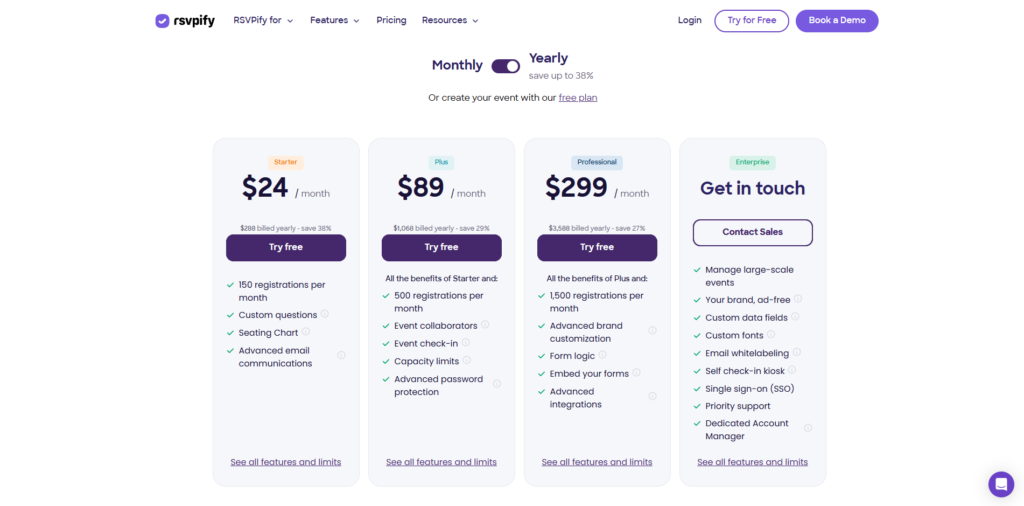
Pricing is often the deciding factor for SaaS tools. RSVPify operates on a freemium model, but understanding the tiers is important to avoid surprises.
The Free Plan
There is a free version available, which is great for small, casual events. It allows for up to 100 RSVPs. However, it is quite limited: it includes RSVPify branding, lacks advanced data features, and doesn’t allow for secondary events. It is good for testing the waters, but professional users will likely need to upgrade.
Personal & Premium Plans
For weddings and one-off private parties, they offer plans that start around $19/month (billed monthly or per event). This unlocks the secondary events, seating charts, and removes third-party ads. It is a reasonable cost considering it replaces the need for a separate website builder and seating chart tool.
Enterprise and Business Plans
For corporate users, the pricing shifts to a higher tier, unlocking features like white-labeling, custom CSS, and priority support. While more expensive, the cost is easily justifiable for businesses when compared to the cost of hiring a developer to build a custom registration portal.
Click here to view the full pricing breakdown and start your free trial.
Pros & Cons
As a reviewer, I believe in total transparency. No tool is perfect, and RSVPify has both strong advantages and a few drawbacks you should be aware of.
The Pros
The biggest advantage is the user interface (UI). It is genuinely enjoyable to use, which is rare for enterprise software. The customization capabilities are also top-tier; you can make your event look like a million bucks without a graphic designer. Furthermore, the “Secondary Event” logic is a lifesaver for complex itineraries. The data handling is robust, ensuring you never lose a guest’s dietary restriction or payment info. Finally, the customer support is responsive and helpful, often providing specific code snippets if you are trying to customize your CSS.
The Cons
On the downside, the learning curve can be slightly steep if you want to use the advanced features. The settings menu is dense because there are so many options. Additionally, some users might find the pricing model a bit confusing initially, as it distinguishes between “Personal” and “Business” use cases. Another minor grievance is that to truly remove all branding and “Powered by RSVPify” footers, you have to be on the higher-tier business plans, which might be out of budget for smaller non-profits. Lastly, the email design tool, while functional, isn’t as advanced as a dedicated tool like Mailchimp, though it is sufficient for event invites.
FAQs
Can I use RSVPify for a free event?
Yes, absolutely. If your event has fewer than 100 guests and you don’t need advanced features like secondary events or seating charts, the free plan is sufficient. It is perfect for small birthday parties or casual get-togethers.
Is my data secure with RSVPify?
Yes, security is a priority for the platform. They use SSL encryption to protect data transmission. For corporate clients, they comply with GDPR and other data privacy regulations, which is essential when handling guest contact information and payment details.
Can I embed the RSVP form on my own website?
Yes, this is one of the best features. If you already have a WordPress or Squarespace site, you can generate an embed code within RSVPify. This allows guests to RSVP without ever leaving your main website, providing a seamless user experience.
How does the check-in app work?
The app works on iOS and Android devices. You simply log in with your account, select the event, and start scanning. It works with the QR codes sent to guests via email. If the internet goes down at your venue, the app has an offline mode that syncs the data once the connection is restored.
Conclusion & Call-to-Action
After thoroughly testing the platform, my verdict is clear: RSVPify is currently one of the most comprehensive and aesthetically pleasing event management tools on the market. It successfully bridges the gap between the simplicity required for a wedding and the data robustness required for a corporate summit.
It eliminates the “spreadsheet fatigue” that plagues event planners and offers a guest experience that feels polished and professional. While the advanced features require a paid subscription, the time saved and the errors avoided make it a worthwhile investment.
If you are ready to take the stress out of your next event and impress your guests from the very first click, I highly recommend giving this tool a try.
Ready to streamline your event planning?
Click here to sign up for RSVPify and start building your event for free today.