In the high-stakes world of digital marketing, “creative strategy” has become the new targeting. We are living in an era where the algorithm does the heavy lifting on media buying, leaving the actual ad creative as the single biggest lever for profitability. However, for years, marketers have struggled with a disjointed workflow: screenshots on phones, messy Google Drive folders, and the constant heartbreak of the Facebook Ad Library deleting winning ads before you could analyze them.
If you are a media buyer, a creative strategist, or a DTC brand owner, you know this pain all too well. You need a swipe file that actually works, and you need a way to bridge the gap between inspiration and execution.
Enter Foreplay.
I have spent the last few weeks integrating this SaaS platform into my daily workflow to see if it lives up to the hype. Is it just a glorified bookmark tool, or is it a legitimate game-changer for AI productivity tools in 2025? In this Foreplay review, I will break down everything you need to know, from its AI-powered features to its pricing, helping you decide if this is the missing piece in your marketing stack.
Overview of Foreplay
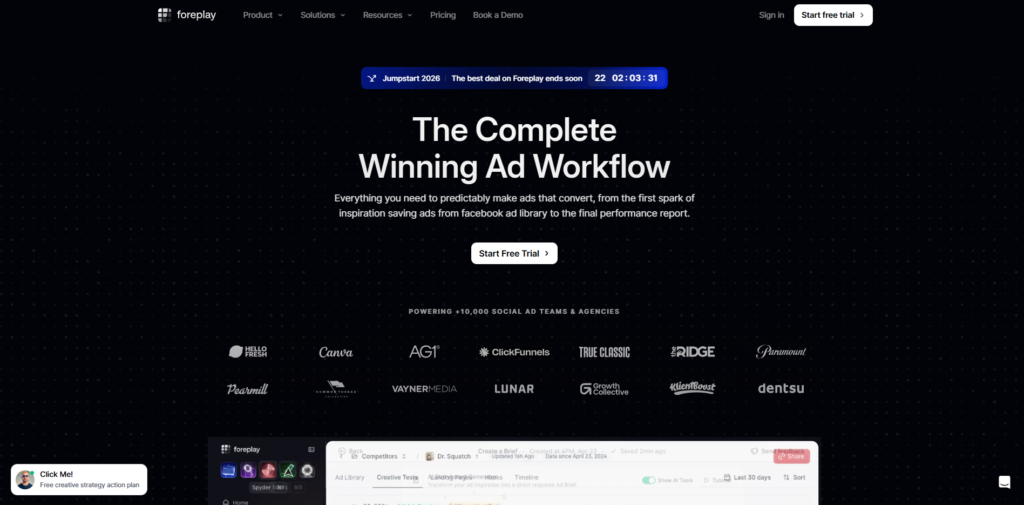
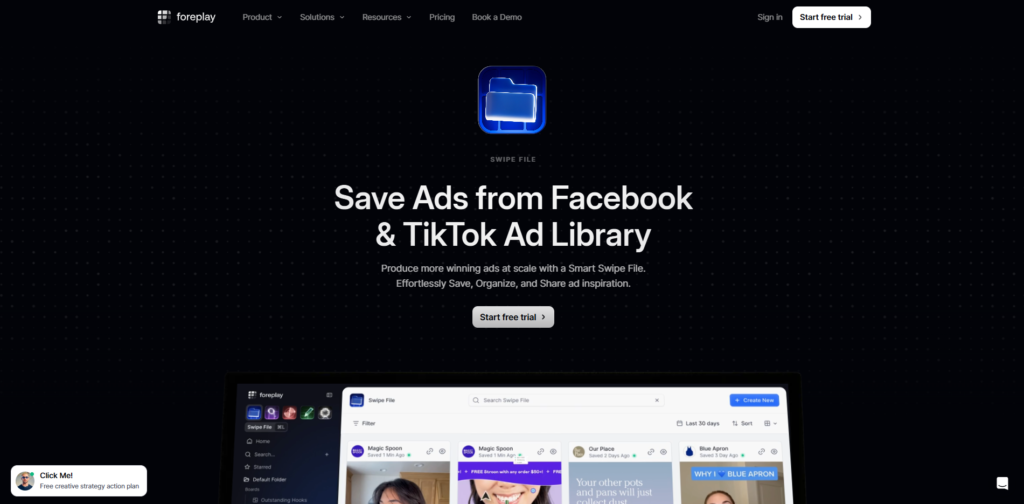
At its core, Foreplay is an all-in-one creative workflow platform designed to help marketers save ads, build briefs, and produce high-converting creatives at scale. It started as a solution to a simple problem: The Facebook Ad Library is temporary. Advertisers turn off ads, and your inspiration vanishes.
Foreplay solves this by allowing you to permanently save ads from platforms like Meta (Facebook/Instagram), TikTok, and LinkedIn. But to call it just a “saver” would be a disservice. It has evolved into a robust ecosystem that includes competitor research, automated transcription, and AI-powered brief building.
The technology behind Foreplay positions it as a bridge. It connects the discovery phase (finding cool ads) with the production phase (telling your editors or UGC creators what to make). By leveraging AI tools for creative strategy, Foreplay aims to reduce the time it takes to go from “good idea” to “live ad” by fully streamlining the chaotic pre-production process.
Key Features & Benefits
Having tested dozens of SaaS tools for marketers, I look for features that actually save time rather than just looking cool. Here is what stood out during my testing of Foreplay.
The “Forever” Swipe File (Chrome Extension)
The bread and butter of Foreplay is its browser extension. When you are browsing the Facebook Ad Library or TikTok Creative Center, a simple “Save” button appears on the ads. Once clicked, that video (along with its ad copy, landing page link, and call-to-action) is downloaded to your private Foreplay cloud. The Benefit: You never lose a winning ad again. Even if the competitor deletes the ad tomorrow, you have it saved permanently in high resolution. This is invaluable for building historical data on what works in your niche.
The Discovery Library
If you don’t have a specific competitor in mind, you can browse Foreplay’s curated Discovery section. This is essentially a community-driven spy tool where you can see what other top-tier marketers are saving. You can filter by industry, format, or platform. The Benefit: It cures “creative block” instantly. You can see trends emerging in real-time across the industry without having to doom-scroll through social media manually.
AI-Powered Ad Analysis & Transcription
This is where Foreplay solidifies its place among the best AI tools for marketers. When you save a video ad, Foreplay automatically transcribes the audio. But it goes further: you can use their AI features to summarize the hook, body, and CTA of the ad. The Benefit: You don’t have to manually type out scripts from competitors’ ads to understand why they worked. The AI breaks down the psychology of the ad for you, making it easier to remix the concept.
The Brief Builder
Saving ads is passive; making ads is active. Foreplay’s Brief Builder allows you to turn your saved “swipes” into a shareable brief for your video editor or UGC creator. You can drag and drop saved videos as references, attach the AI-generated script, and create a storyboard. The Benefit: It eliminates miscommunication. Instead of telling your editor, “Make it pop like that one Nike ad,” you send a structured link with the exact visual references and timestamps.
Landing Page Preservation
A feature often overlooked is that Foreplay screenshots the landing page associated with the ad at the time of saving. The Benefit: An ad is only as good as the page it sends traffic to. This feature allows you to analyze the congruency between the ad creative and the landing page offer.
Ideal Users / Use Cases
Foreplay is not for everyone. If you are a casual poster who doesn’t run paid traffic, this might be overkill. However, for specific groups, it is arguably essential.
Direct-to-Consumer (DTC) Brand Owners
If you are managing your own ads, you need to move fast. Foreplay allows you to keep an eye on your three biggest competitors. You can see what offers they are running and what creative angles they are testing. It creates a centralized hub for your marketing brain.
Creative Strategists & Ad Agencies
For agencies, client approval is a bottleneck. Foreplay allows you to create “Boards” (folders) for specific clients. You can share a link to a board of proposed creative concepts, and the client can view them without needing a login. This professional presentation builds trust and speeds up sign-offs.
UGC Creators & Video Editors
Creators often struggle to understand exactly what the brand wants. By using Foreplay, creators can build their own portfolios of “styles” they can execute. Conversely, brands can send Foreplay links to creators to show exactly the type of pacing and hook structure they require.
Performance Marketers
If you are obsessed with ROAS (Return on Ad Spend), you need data. By using Foreplay to analyze winners, you can deconstruct high-performing assets to understand the variables: is it the green screen background? The robotic voiceover? The text overlay? Foreplay helps you isolate these variables.
How It Works
Getting started with Foreplay is surprisingly intuitive. Here is the typical workflow I utilized during my review period.
Step 1: Installation & Setup
First, you sign up for a Foreplay account. Once inside, you install the Chrome Extension. This takes about 30 seconds.
Step 2: The Hunt (Curating)
You navigate to the Facebook Ad Library or TikTok. You will notice the Foreplay interface overlaying the ads. You create “Boards” (e.g., “Pet Food Competitors,” “Black Friday Ideas,” “UGC Hooks”). As you browse, you simply click “Save to [Board Name].”
Step 3: Deep Dive Analysis
Back in the Foreplay dashboard, you open your board. You click on a saved ad. Here, you can watch the video frame-by-frame. You can read the AI transcription. You can tag the ad with labels like “Social Proof,” “Unboxing,” or “Problem/Solution.”
Step 4: Building the Brief
You open the Brief Builder tab. You select the “Social Proof” ad you just saved as a visual reference for “Scene 1.” You use the AI rewriter to tweak the script so it fits your brand’s tone of voice.
Step 5: Sharing
You generate a public link for the brief. You send this link to your video editor on Upwork or your in-house content team. They open the link, see the reference video, read the script, and get to work.
Pricing
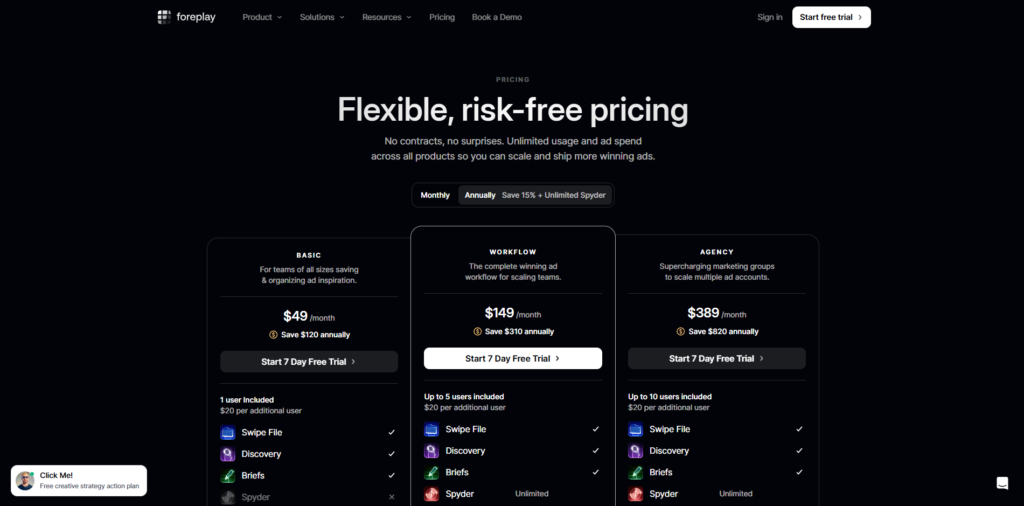
Pricing is often the make-or-break factor for SaaS tools. Foreplay offers a tiered structure designed to scale with your business. While prices are subject to change, here is the general structure at the time of this Foreplay review.
- Free Trial: Foreplay typically offers a 7-day free trial. This is plenty of time to save a few hundred ads and test the brief builder. I highly recommend you start the free trial to see if it fits your workflow.
- Starter Plan: Geared towards solo founders or small creators. It gives you a generous limit on saved ads and access to the Discovery library. It is affordable and pays for itself if it helps you launch just one winning ad.
- Plus / Pro Plan: Designed for power users and small teams. This unlocks unlimited saves, higher quality downloads, and more robust AI features. This is the sweet spot for most professional media buyers.
- Agency Plan: This allows for multiple seats (team members) and advanced sharing permissions. If you run an agency, this cost is negligible compared to the hours saved in internal communication.
There is no “Free Forever” plan, which is standard for tools that require significant server storage for high-res video hosting.
Pros & Cons
As a professional reviewer, I believe in transparency. No tool is perfect, and Foreplay is no exception. Here is my honest assessment.
The Pros
First and foremost, the User Experience (UX) is beautiful. It is clean, dark-mode friendly, and snappy. It feels like a modern software tool, not a clunky legacy platform.
Secondly, the “Permanent Save” feature is reliable. I tested this by saving an ad and then trying to find it on the Ad Library a week later. The Ad Library link was dead, but the Foreplay link was alive and playing in HD.
Thirdly, the AI integration is practical. Many tools slap “AI” on their landing page as a gimmick. Foreplay’s use of AI for transcription and script rewriting is genuinely useful for the daily tasks of a strategist.
The Cons
The mobile experience is currently limited. Foreplay is heavily designed for a desktop workflow (Chrome Extension). While you can view boards on mobile, the heavy lifting of saving and brief building really needs to happen on a computer.
Additionally, for absolute beginners with zero budget, the monthly subscription might feel like an extra expense. However, if you are spending money on ads, the cost of Foreplay is a fraction of what you would waste on bad creative testing.
FAQs
Does Foreplay work with TikTok ads?
Yes, Foreplay supports saving ads from TikTok, including the TikTok Creative Center. This is crucial as TikTok has become a dominant platform for UGC-style creative inspiration.
Can I download the videos to my computer?
Absolutely. One of the best features is the ability to download the raw MP4 file of any ad you have saved. This is perfect for dropping into Slack channels or editing software for internal mood boards.
Is Foreplay better than just using a spreadsheet?
Yes, significantly. A spreadsheet with links to the Facebook Ad Library will eventually “rot” because the links expire when advertisers turn off the ads. Foreplay hosts the video file, ensuring your library is permanent.
Can I share my boards with clients who don’t have an account?
Yes. You can generate “Public Links” for boards. Your client can view the ads, play the videos, and read the copy without needing to pay for a subscription or log in.
How does the AI help with writing ads?
The AI analyzes the transcript of high-performing ads you save. It can then help you restructure that script for your own product, ensuring you hit the same psychological triggers (hook, retention, CTA) without plagiarizing the content.
Conclusion & Call-to-Action
After extensively using the platform, my verdict is clear: Foreplay is currently the gold standard for creative workflow management. It transforms the chaotic process of ad research into a streamlined, scientific system.
For marketers navigating the landscape of AI productivity tools in 2025, Foreplay stands out because it solves a tangible problem. It doesn’t just give you data; it gives you your time back. It bridges the gap between seeing a great ad and understanding how to recreate that success for your own brand.
If you are serious about scaling your Facebook or TikTok ads, you cannot afford to rely on temporary screenshots and expired links. You need a professional swipe file.
Ready to upgrade your creative strategy?
Stop guessing what works and start building a library of winners.
Click here to start your 7-Day Free Trial of Foreplay today and experience the difference a dedicated creative workflow can make for your ROAS.