Creating professional presentations has traditionally been a time-consuming process, requiring hours of structuring content, designing slides, and polishing visuals. In an era where speed and clarity define productivity, AI-powered tools are rapidly reshaping how presentations are made. This MagicSlides review explores whether this popular AI presentation generator truly delivers on its promise to save time while maintaining quality.
For professionals, marketers, educators, and founders searching for AI productivity tools in 2025, MagicSlides positions itself as a practical solution that bridges creativity and efficiency.
Overview of MagicSlides
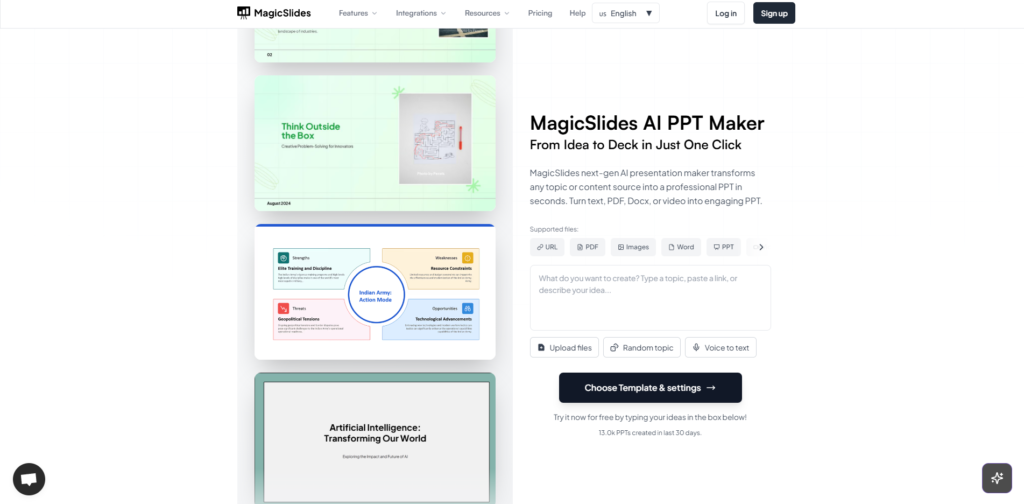
MagicSlides is an AI-powered presentation tool designed to automatically generate Google Slides or PowerPoint-style decks from simple text prompts, topics, or documents. Built with modern natural language processing technology, the platform focuses on reducing manual slide creation while maintaining a clean, professional structure.
The core idea behind MagicSlides is straightforward: instead of starting from a blank slide, users input a topic or outline, and the AI instantly generates a structured presentation with headings, bullet points, and visual hierarchy. This makes it especially appealing among best AI tools for presentations, particularly for those working under tight deadlines.
Key Features and Benefits
AI-Powered Slide Generation
The standout feature of MagicSlides is its ability to transform short prompts into full presentations within seconds. After testing multiple topics, the AI consistently produced logical slide structures with well-organized content. This dramatically reduces preparation time, especially for repetitive or research-heavy presentations.
Google Slides Integration
MagicSlides integrates seamlessly with Google Slides, allowing generated decks to be edited, shared, and presented immediately. This eliminates compatibility issues and supports real-time collaboration, making it ideal for remote teams and educators.
Topic-to-Presentation Workflow
Instead of manually outlining slides, MagicSlides converts a single topic or paragraph into multiple slides. Each slide is broken down into concise bullet points, which improves clarity and readability for audiences.
Time-Saving for Professionals
From personal experience, MagicSlides significantly cuts down the initial creation phase. While some refinement is still required for tone and branding, the base structure provided by the AI removes the most tedious part of presentation design.
Beginner-Friendly Interface
The interface is clean and intuitive, requiring no prior design or technical skills. This positions MagicSlides as one of the more accessible AI productivity tools in 2025 for non-technical users.

Ideal Users and Use Cases
MagicSlides is not designed for advanced graphic designers seeking heavy customization, but it excels for speed-focused users. The tool fits naturally into several workflows.
Educators can quickly generate lecture slides or lesson summaries without spending hours formatting content. Startup founders and business professionals benefit from fast pitch deck creation when preparing investor meetings or internal reports. Content creators and marketers can use MagicSlides to repurpose blog content into presentation format for webinars or workshops.
For anyone searching for best AI tools for productivity, MagicSlides serves as a reliable assistant rather than a replacement for creative judgment.
How MagicSlides Works
The process begins by entering a topic, text, or outline into the MagicSlides interface. The AI analyzes the input and identifies key points, subtopics, and logical flow. Within seconds, a complete presentation draft is generated.
Once the slides are created, they can be exported directly into Google Slides. From there, additional edits such as branding, visuals, or custom layouts can be applied. The workflow feels smooth and intuitive, minimizing friction between ideation and final output.
This streamlined process highlights why MagicSlides is often mentioned in discussions around AI productivity tools in 2025.
Pricing and Plans
MagicSlides offers a free version that allows limited slide generation, which is useful for testing the platform’s capabilities. Paid plans unlock more advanced features, higher usage limits, and faster generation times.
Based on market comparison, pricing is positioned competitively among AI presentation tools. For professionals who regularly create presentations, the paid plan delivers strong value by significantly reducing labor costs and time investment.
While pricing may evolve, MagicSlides remains affordable compared to hiring designers or spending hours on manual slide creation.

Pros and Cons
One of the strongest advantages of MagicSlides is speed. The AI consistently generates structured presentations in seconds, making it highly effective for fast-paced environments. Integration with Google Slides further enhances usability and collaboration. The learning curve is minimal, which makes the tool accessible to beginners and non-designers.
However, MagicSlides is not without limitations. Visual design customization is relatively basic compared to full-fledged design software. Generated content may occasionally feel generic and require human refinement for storytelling or branding alignment. Despite these drawbacks, the time saved often outweighs the need for minor adjustments.
Overall, the balance between automation and manual control feels reasonable for its target audience.
Frequently Asked Questions
Is MagicSlides suitable for professional business presentations?
Yes, MagicSlides generates clean and structured slides suitable for meetings, reports, and internal presentations. Minor edits can further enhance professionalism.
Does MagicSlides replace human creativity?
MagicSlides functions as a productivity assistant rather than a creative replacement. It accelerates structure and content generation while leaving creative decisions to the user.
Can MagicSlides be used for educational purposes?
Absolutely. Educators can quickly generate lesson slides, summaries, and teaching materials with minimal effort.
Is MagicSlides one of the best AI tools for presentations?
Among tools focused on speed and simplicity, MagicSlides stands out. It is particularly effective for users prioritizing efficiency over advanced design control.
Does MagicSlides support collaboration?
Through Google Slides integration, presentations can be shared and edited collaboratively in real time.
Conclusion and Call to Action
This MagicSlides review highlights a practical AI solution for anyone seeking faster and more efficient presentation creation. By automating the most time-consuming aspects of slide building, MagicSlides allows professionals, educators, and creators to focus on delivering ideas rather than formatting content.
For those exploring best AI tools for productivity and reliable AI productivity tools in 2025, MagicSlides offers a compelling balance of simplicity, speed, and value.
MagicSlides is especially recommended for users who frequently build presentations and want to reclaim hours each week. Exploring the platform through an affiliate link provides an easy entry point to experience how AI can transform presentation workflows.