For the better part of a decade, my desk looked like a command center for a spaceship—dominated by aggressive angles, RGB lights that could land a plane, and matte black plastic that seemed to attract fingerprints by the second. As a writer, my keyboard is my instrument. It’s where I spend eight to ten hours a day. Yet, for years, I treated it purely as a utility, ignoring how it made my workspace feel.
That changed when I stumbled upon Lofree.
Based on the concept of “The 2m² Strategy”—the idea that we should curate the two square meters around us to spark joy and creativity—Lofree stands out in a crowded market. They aren’t trying to be the fastest gaming peripheral company. They are trying to be the most beautiful.
Over the last month, I’ve swapped out my standard gear for a full Lofree setup. I wanted to see if these products were just “Instagram pretty” or if they could actually handle the rigors of a professional writing workload. The short answer? They are surprising.
Here is my honest, deep-dive review of five standout pieces from the Lofree collection that might just change how you view your desk.
The Game Changer: Lofree Flow
Category: Low Profile Mechanical Keyboard
If you have ever typed on a laptop and wished it had more “soul,” or typed on a mechanical keyboard and wished it wasn’t so tall and clunky, the Lofree Flow was made for you. This is arguably the product that put Lofree on the map for serious keyboard enthusiasts, not just design lovers.
My Real-World Experience
The first time I touched the Flow, I was confused. It is incredibly thin, yet it feels dense and premium. Most low-profile keyboards feel rattly or cheap because there isn’t much room for the internal components to dampen the sound.
Lofree solved this with something called a “Gasket Mount”—a feature usually reserved for high-end, thick custom keyboards. When I started typing, the sensation was “creamy.” That is the only way to describe it. The keys don’t slam down hard; they have a soft, cushioned landing.
I tested the version with the “Ghost” (Linear) switches. Typing a 3,000-word draft on this felt effortless. My wrists didn’t hurt because the keyboard is so low to the desk, I didn’t even need a wrist rest. The PBT keycaps have a slight texture to them, which feels much better than the slippery ABS plastic found on most laptops.
Pros
- Incredible Typing Feel: It provides the smoothest typing experience I have ever felt on a low-profile board. The gasket mount really works.
- Build Quality: The all-aluminum body feels cold to the touch and extremely solid. There is zero flex.
- Hot-Swappable: Unusually for low-profile keyboards, you can actually change the switches if you want a different feel later on.
- Subtle Backlight: The side-lit RGB lights (under the chassis) add a nice ambient glow without being blinding.
Cons
- Battery Life: Because it is so thin, the battery is smaller. If you keep the backlights at 100%, you will be charging it every few days.
- Non-Adjustable Angle: The feet are fixed. The typing angle is comfortable for me, but if you like a steep incline, you might miss adjustable feet.
- Connectivity: While it connects fast via Bluetooth, switching between devices takes a second or two longer than I’d like.
Who is this for?
The Lofree Flow is the ultimate tool for writers, coders, and digital nomads who want a premium mechanical feel but need something portable and sleek. It is the perfect bridge between a MacBook keyboard and a custom mechanical keyboard.

The Nostalgic Powerhouse: Lofree Block
Category: 98 Wireless Mechanical Keyboard
While the Flow is modern and sleek, the Lofree Block screams “Retro Braun Design.” It looks like something that would have been on a high-end office desk in 1995, but with 2025 technology inside.
My Real-World Experience
Visually, this is my favorite. The greyish-white color scheme with the bright orange hermetic knobs is a design masterclass. It brings a sense of calm structure to the desk.
The Block uses full-sized switches, so it’s much taller than the Flow. The typing sound here is what enthusiasts call “Thocky.” It’s a deep, satisfying “thud” rather than a high-pitched “click.” It sounds expensive.
One feature I found myself using constantly was the two round knobs on the top right. One controls the volume, and the other changes the connection mode (Bluetooth/Wired/2.4G). There is something incredibly satisfying about physically turning a knob to shut off the sound when a loud ad plays, rather than fumbling for a function key.
However, be warned: this is a big boy. It commands space. It includes a number pad, which was a lifesaver when I was doing my monthly expense spreadsheets.
Pros
- The Sound: It sounds fantastic right out of the box. No modifications needed to get that deep, rich typing sound.
- The Knobs: The physical controls for volume and connection are intuitive and fun to use.
- Status Panel: There is a minimal status panel that clearly shows your battery life and connection status, so you are never left guessing.
- Comfort: The keycaps are “spherical,” meaning they cup your fingertips slightly. It helps with typing accuracy.
Cons
- Height: You absolutely need a wrist rest with this. Thankfully, strictly speaking regarding design, its height requires ergonomic support to prevent wrist strain over long periods.
- Weight: It is not portable. Once you put it on your desk, it stays there.
- Plastic Case: Unlike the Flow’s aluminum, the Block is made of plastic. It’s high-quality plastic, but it lacks that metallic premium touch.
Who is this for?
The Lofree Block is for office workers and accountants who need a number pad but are tired of boring office equipment. It’s also for design enthusiasts who love the retro-industrial aesthetic of the 90s.
The Fashion Statement: Lofree Dot “Foundation”
Category: Mechanical Keyboard
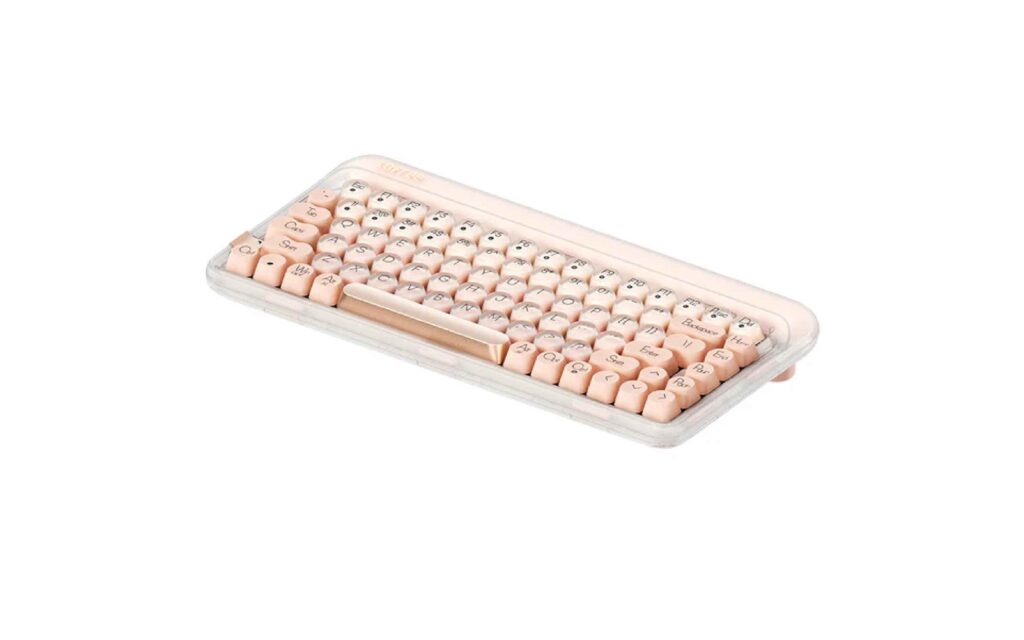
If the Block is industrial design, the Lofree Dot is pure fashion. The “Foundation” series is inspired by liquid makeup foundation, featuring semi-transparent layers and a gradient color palette.
My Real-World Experience
I have to be honest: I was skeptical. Usually, when tech tries to look like fashion, it fails at being tech. But the Dot Foundation surprised me.
The keycaps are round, imitating a vintage typewriter. I will admit, the first hour of typing on this was a struggle. We are so used to square keys that my fingers kept slipping off the edges. However, by the end of the day, I had adjusted.
The aesthetic impact is undeniable. I had this sitting on my desk when a friend came over, and it was the first thing they commented on. The “Gateron Baby Raccoon” switches inside are surprisingly snappy and responsive. They have a distinct “clack” that feels very rhythmic.
The build quality is distinct—the chassis has a layered, glossy finish that genuinely looks like a bottle of high-end cosmetics. It feels precious, almost like jewelry for your desk.
Pros
- Unique Aesthetics: There is nothing else on the market that looks like this. It is a conversation starter.
- Great Switches: Despite the fashion look, the internal switches are high-performance and smooth.
- Mac/Windows Compatibility: The switch on the side makes it very easy to toggle between operating systems.
Cons
- Learning Curve: The round keycaps are harder to type on accurately if you are a speed typist. You sacrifice some speed for style.
- Fingerprint Magnet: The glossy finish looks beautiful, but it catches fingerprints easily. Keep a microfiber cloth nearby.
- Layout: It is a compact layout, so the arrow keys are a bit squished.
Who is this for?
The Lofree Dot is for creatives, influencers, and style-conscious users who view their workspace as an extension of their personality. If you care about how your desk looks on camera or simply want an object of beauty, this is the one.
The Perfect Companion: Lofree Touch PBT Wireless Mouse
Category: Wireless Mouse
You can’t have a retro keyboard and use a futuristic, glowing gaming mouse. It just doesn’t match. The Lofree Touch PBT Mouse was designed to solve this problem.
My Real-World Experience
This mouse looks strange at first glance. It has separate “plate” buttons that look like potato chips. But the moment I rested my hand on it, it made sense.
The “PBT” in the name refers to the material. Most mice use ABS plastic, which gets shiny and oily after a few months of use. PBT is a textured, durable plastic that resists oil. After weeks of use, this mouse still felt dry and grippy, which is a huge plus for me as I tend to get clammy hands when working against deadlines.
It features a small OLED screen on the side which displays DPI (sensitivity) and battery level. This is a feature I didn’t know I needed. I loved knowing exactly how much charge I had left rather than waiting for a red blinking light of death.
The sensor is sharp enough for design work (Photoshop/Lightroom), though I wouldn’t use it for competitive gaming.
Pros
- PBT Material: It never feels sticky or greasy. The texture is fantastic.
- Ergonomics: Despite the retro look, the curve fits the palm very comfortably for medium-sized hands.
- OLED Screen: A practical addition for monitoring settings and battery.
- Connectivity: Supports Bluetooth and 2.4G dongle, making it versatile for different devices.
Cons
- Side Buttons: The side buttons are a bit small and mushy compared to the crisp main clicks.
- Weight: It is on the lighter side. If you prefer a heavy mouse for precision, this might feel a bit airy.
- Design Polarizing: The “chip” button design is love-it-or-hate-it visually.
Who is this for?
This is for anyone buying a Lofree keyboard. It completes the look. It’s also excellent for people who hate oily/shiny mice and want a peripheral that stays looking clean and matte.
The Mood Setter: Lofree Mid-Summer Candlelight
Category: Desk Accessory / Lamp
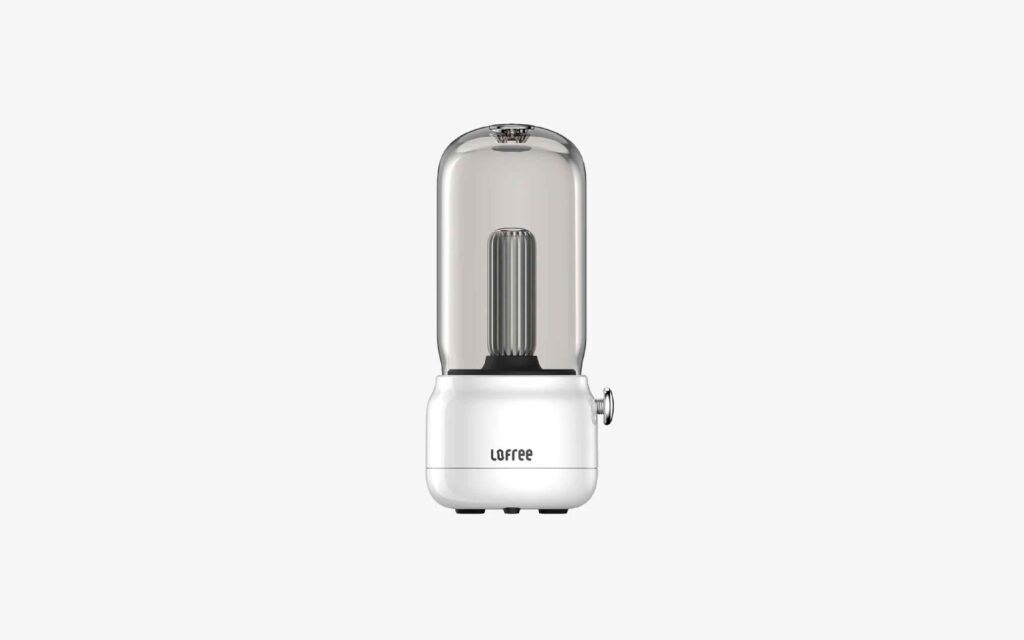
Finally, I wanted to review something that wasn’t a tool, but an “atmosphere creator.” The Mid-Summer Candlelight is a portable lamp designed to mimic the flicker of a traditional lantern.
My Real-World Experience
Working late at night, the harsh blue light of a monitor can be draining. I placed the Candlelight next to my laptop and turned the knob.
The light it emits is a warm, 1800k golden glow. It’s not bright enough to read a book by comfortably, but that’s not the point. It’s designed to create a “vibe.” There is a “breathing mode” where the light gently pulses, mimicking a real candle flame.
I found myself using this not just on my desk, but carrying it to the dining table for dinner and even out to the balcony. It charges via USB-C (thankfully), so I didn’t have to hunt for batteries.
The transparent acrylic cover looks like glass but is durable, and the base has a nice weight to it, so it doesn’t tip over easily. It added a sense of warmth to my workspace that made late-night writing sessions feel less like work and more like a quiet ritual.
Pros
- Atmosphere: It creates an instant cozy, “hygge” feeling.
- Portability: The battery life is solid (lasted me about a week of evening use), and it’s easy to move around.
- Adjustable Brightness: The knob allows for smooth dimming control.
- Charging: USB-C charging means you can use your keyboard cable to charge your lamp.
Cons
- Not a Task Light: Do not buy this expecting to light up your paperwork. It is purely ambient.
- Price: For a lamp, it is on the premium side compared to generic options on Amazon.
- Charging Light: There is a small red LED when charging that ruins the aesthetic slightly if you are looking right at it.
Who is this for?
The Mid-Summer Candlelight is for the desk setup perfectionist. If you want your workspace to feel cozy, inviting, and warm—especially for late-night work—this is the finishing touch you didn’t know you needed.
Conclusion: Is the “Lofree Lifestyle” For You?
After immersing myself in the Lofree ecosystem, I’ve come to a realization: These aren’t just computer peripherals; they are antidotes to the sterile, corporate office culture.
If you judge them purely on a spec-sheet basis (latency, polling rate, raw performance), you might find cheaper options elsewhere. But you don’t buy a vintage Porsche because it’s faster than a modern Tesla; you buy it for the feeling.
My Verdict:
- The MVP: The Lofree Flow is the absolute winner. It combines form and function perfectly. If you buy only one thing, make it this keyboard.
- The Aesthetic King: The Lofree Block and Touch Mouse combo creates a workspace that makes you want to sit down and work.
Lofree proves that technology doesn’t have to be cold and boring. It can be warm, tactile, and beautiful. If you are tired of the “black plastic box” life, Lofree is a refreshing escape.
Next Step: Take a look at your current desk. If it feels uninspired, start small—perhaps with the Touch Mouse or the Flow keyboard—and see how a single piece of well-designed gear can shift your entire working mindset.